


TikTok has become the platform to showcase creativity and talents. Creators and influencers post their short videos to share the message, show talent, and reach their audience. Over time, TikTok keeps updating its platform with new features that hold users’ attention and keep them on the platform.
Here in today’s post, we are also talking about another cool feature on TikTok, which is replying to comments with a video. Instead of typing the text message, you can make your response visual and engaging. Let’s talk about how you can reply to a comment on TikTok with a video and why it’s so awesome!
Can You Reply to TikTok Comments With a Video?

Yes, with the latest feature, you can now reply to TikTok comments by adding a video, instead of the normal text. So, next time when someone comments on your post, you can tap on the comment, then select the ‘Reply with video’ option.
Next, it will open the camera to record your video. Or you can also upload the video from the library to respond to that comment. When adding the video will appear in the reply under the comments, as well as this video will also appear as the new post.
To use this feature, you need to update your TikTok app, as it’s the latest feature. Overall, the video reply feature is a creative and more appealing way to interact with your followers. Try it.
You don’t want to ignore these trending TikTok hashtags that push your post to a wider audience.
Benefits of Replying to TikTok Comments With Videos
You want to reply to most comments on your post from your followers or audience. It builds a connection with them and makes them feel heard. But now that TikTok allows to use of video as a reply, there are more benefits than that.

- When you reply with a video, there’s a greater chance that your post reaches more people than a normal text reply.
- Undoubtedly, the video repy are more interactive and feel more personal as the commentator can see that you value their words.
- Compared to the regular text, the video responses are more creative.
- As you’re recording video to respond, you can show your actual emotions without having to use trending emojis that are most commonly used.
- It will help in making the conversation feel more lively and direct.
- You can ask questions or answer questions being asked of you. So interaction is more authentic and active.
Thinking beyond the views or impressions, you can use the video reply to provide guidance, advice, tips, or consult someone who has some queries or questions for you.
There is list of trending TikTok songs that can make your post more popular and even viral.
How to Reply to a Comment on TikTok With a Video (Mobile App)

If you are excited to use this video reply feature on TikTok, here’s how you can:
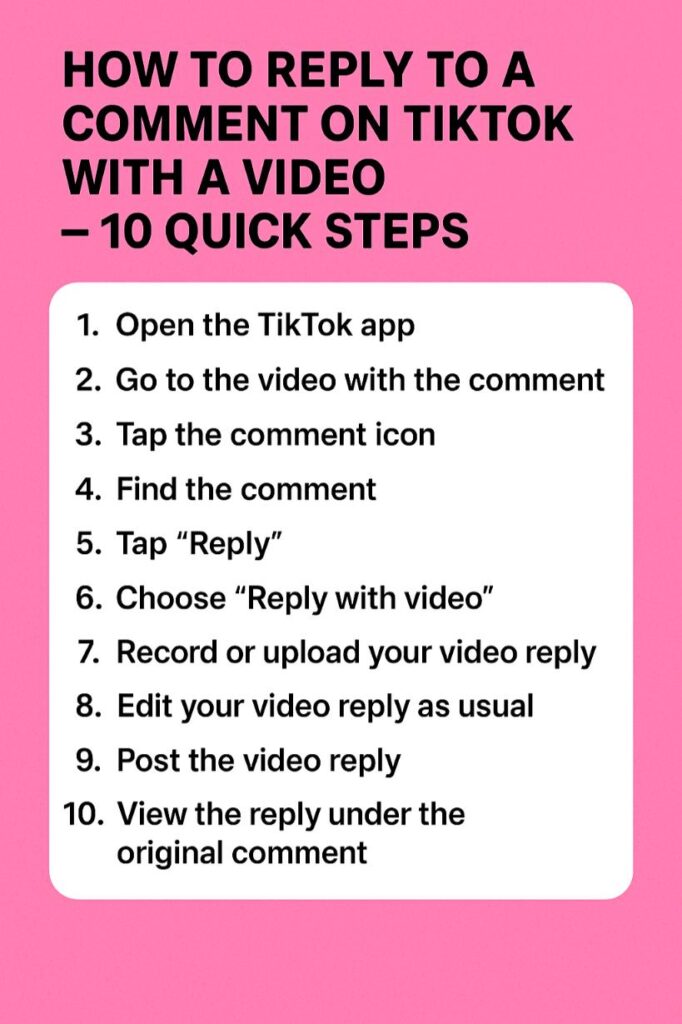
- Open the TikTok app.
- Go to that particular comment where you want to reply.
- Tap and hold on those comments to open the ‘Reply’ option.
- Select ‘Reply with video’.
- It will open the camera, so you can ‘record’ your response.
- Or you have the video already, you can ‘upload’ it as a reply.
- Hit ‘Post’.
That’s it, you have replied with a video on TikTok. This video will also be posted on your profile as a new post.
Make a stylish profile by using the best TikTok bio ideas for everyone.
How to Reply to a Comment With a Video on TikTok (Desktop / PC)

The ‘video reply’ feature is available mostly on the app, and has not fully launched on the desktop or pc version. But if you want to reply to a comment with a video on TikTok, you should check if your browser supports this feature or not.
However, you can record or upload a video as a separate reply and mention the commenter using ‘@’. This way, you can send them a video response.
In the future, when TikTok makes the feature live for desktop, you can use it. But for now, you can use the mention feature to reply as a video. Otherwise, you can use the mobile app to use this video reply feature.
Reasons I Can’t Reply to a Comment With a Video

If you have tried as we just suggested, but can’t reply to a comment with a video, there are some reasons behind it. Here common reasons for that:
- You might be using the older version of TikTok. So, you have to update the app to use this new feature.
- TikTok has limited this feature usage to some accounts or regions. This could be the prime reason why you are unable to reply to a comment with a video.
- This feature doesn’t work on private videos.
- When the comments section has limited permission, this feature won’t work.
- Lastly, there could be some technical reasons behind why the video reply isn’t available for some time.
If you want to make your comment stand out, you can use our comment generator tool for free.
Conclusion
Replying to comments is normal. But replying with a video is a unique way to engage with your audience or followers. As an influencer or creator, you want to know how to reply to a comment on TikTok with a video that engages them well.
Well, we hope that this guide has provided helpful advice. But you want to be sure that the video you use as a response has to match the context. Make it fun, engaging, and importantly, use your creativity when replying with a video. Your meaningful, but unique reply not only engages them, but also amazes them at how creative you are.
FAQs
Can I reply to my own comment with a video?
Yes. For that, you need to find your comment on the video and use the option ‘Reply with video’.
Why is the “video reply” option missing on my TikTok app?
This is a new feature on the app. So you need to update your TikTok application, or also possible that this feature isn’t available in your region yet.
Does replying with a video increase views?
Yes. When you use video to reply, instead of text, you can expect a boost in video, and that way, your video can reach a wider audience.
Can I delete a video reply later?
Yes, if you wish to delete the video reply for some reason, you can do so anytime.



