

If you’re an Instagram fashion creator, you understand how difficult it is to keep the interest of people while they swipe through your content. Gorgeous photos go a long way, but voice makes the difference. A great voiceover shares the story about your looks and keeps your audience engaged from beginning to end.
That’s where the CapCut Desktop Video Editor saves the day. It allows you to convert your text to voice through its built-in Text to speech AI feature. You don’t have to record anything or pay another person to do it. Feel free to express what you need to say.
Here, in this tutorial, you will get to know how to narrate your fashion carousels using CapCut PC with easy, easy-to-follow steps.

Why Use TTS for Fashion Carousels?
Engages Viewers
When users browse Instagram, they scroll quickly. A voice slows them down. It narrates and links each slide better. Your post is easy to track.
Using the CapCut Desktop Video Editor, you can synchronize the voice to your brand by using the AI voice generator. This makes the tone of your post sound natural and seamless.
Contributes Personality Without Having to Record
You don’t have to record your voice. Simply type what you want to say, and select a voice that suits. Some of the voices sound friendly. Some of the voices sound confident.
You get to decide what works best with your image. Your voice remains consistent from post to post. This ensures your brand remains consistent.
Ideal for Batch Creation
You can write a lot of carousel posts at once. Upload your pictures, include the voice, and go to the next one. This comes in handy if you post frequently and want to save time.
If any picture appears soft or blurry, utilize the AI video upscaler on CapCut PC. It makes your pictures appear clean and crisp, and this makes your post stand out.
Accessibility
Some individuals have a difficult time reading. Others would rather hear it. A voice makes your message easy to understand. It also makes people comprehend your content without reading each word.
Multi-language Support
A selection of voices and languages is available for you to choose from. If your audience is worldwide, this makes your posts easy to access. It also saves time when you wish to reach more people with the same message.
Key Observation:
The CapCut Desktop Video Editor provides you with numerous tools for free. But some things, such as extra voices in the text-to-speech AI tool, will cost money or require a plan.
Steps to Add AI Voiceover to Instagram Fashion Carousels
Step 1: Install and Download CapCut PC

First, visit the official CapCut Desktop Video Editor website. You’ll find the download button on the front page. Click to begin.
After downloading the file, open it and install it on your laptop or desktop by following the instructions. Once you’ve finished, open the app and log in. Access to all features, including the text to speech tool, is provided.
Step 2: Import Slides to the Timeline

Open the CapCut Desktop Video Editor and press “New Project”. This directs you to the editing space. Click the “Import” button to add your fashion carousel slides. Use images or short videos. After adding them, drag them onto the bottom timeline.
Step 3: Add Voice Using Text to Speech Tool
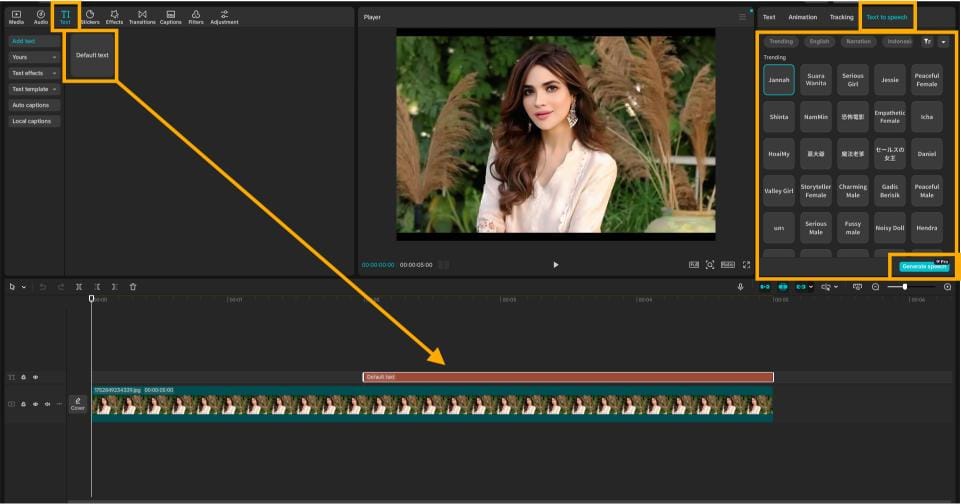
Click “Text” from the left-hand menu. Then click “Default Text” to insert a text box in the timeline. Enter or paste your voiceover script into this box.
Next, go to the top of the screen and click “Text to speech”. A pop-up of voice styles will come up. Select one that suits your content; male or female, soft or strong.
Utilize text to speech AI technology to listen to the generated voice. You can fine-tune how it sounds by altering the pitch or speed.
Step 4: Export and Share to Instagram

When your slides and voice go well together, hit the “Export” button at the top. Choose a format that is suitable for Instagram, such as square or vertical. Save it to your computer. You’re now ready to publish it as either a Reel or a carousel post on your Instagram account.
Conclusion
If you wish your fashion blog posts to get more attention, voice can do the trick. The CapCut Desktop Video Editor provides you with a means of adding voice without recording. You simply write your message and choose a voice that suits your tone.
This is perfect for bloggers, content creators, and marketers who frequently post. It maintains your content clearly and consistently.
Though most CapCut PC features are free, there are some voices and tools that can be paid for. Yet even the free versions can be very useful.
Have a go at your next fashion carousel. Visit the official CapCut website, download the app, and begin telling your style story with voice